
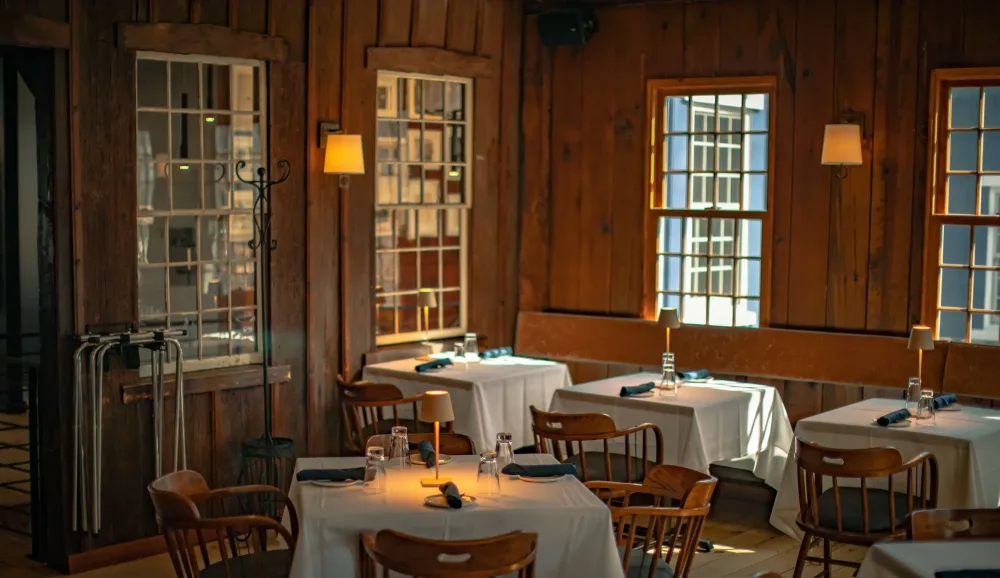
A private event venue listing should include the location, event spaces, capacities, privacy level, food and beverage options, pricing approach, amenities, photos, and a clear way to inquire. The goal is to help a planner determine fit before they contact you.
Good venue copy is specific. “Perfect for any occasion” does not tell a corporate planner whether a room supports a presentation or a family whether children are welcome. Explain what the guest can actually book and experience.
Start with a clear description
Open with the venue type, neighborhood or city, and the events you serve well. Describe the style in ordinary language. Include a useful distinction such as a private dining room, an outdoor area, a brewery taproom, or an activity space with food service.
Use search phrases naturally when they describe your venue. A sentence about private dining in your actual city is useful. A list of nearby cities you do not serve or repeated “best event venue” claims adds little information.
List spaces separately
| Field | What a planner needs |
|---|---|
| Space name | A consistent name used in photos and proposals |
| Privacy | Private, semi-private, or shared, with an explanation |
| Seated capacity | Capacity for the specific dining layout |
| Standing capacity | Capacity for the approved reception layout |
| Access period | Setup, guest event, and cleanup timing |
| Food and beverage | In-house menus, bar arrangements, and outside-vendor policy |
| Pricing | Minimum spend, rental, per-person package, or combination |
| Conditions | Date restrictions, weather plan, and material limitations |
Never add the capacities of rooms that cannot operate together. Do not use a standing occupancy number to advertise seated dinner capacity. If a layout is still being reviewed, describe it as unconfirmed until verified.
Show the room as an event space
Choose photos that answer practical questions: how the tables fit, where guests arrive, where a bar or buffet sits, and what the atmosphere looks like during the relevant time of day. Add an accurate floor plan if you have one.
Use current images you have permission to publish. Get appropriate permission for identifiable guests and client branding. Write descriptive image alt text, such as “Private dining room arranged with a long table for a team dinner.” Avoid stuffing keywords into every image description.
Explain price and inclusions
State the model clearly. A $2,000 minimum spend, a $2,000 rental fee, and a $2,000 inclusive package create different expectations. If prices vary, explain the factors and provide a realistic starting point with its conditions.
Identify whether quoted figures exclude tax, service charges, gratuity, rentals, or other fees. Indicate what guests receive: tables and chairs, staffing, linens, menus, bar service, equipment, and access time. Keep the full binding terms in the proposal and agreement.
Cover logistics that affect suitability
Explain parking and transit accurately. Describe step-free access and restroom access with confirmed details rather than using a vague accessibility label. State whether amplified sound, outside desserts, decorations, or third-party entertainment require approval.
For a corporate event, distinguish available Wi-Fi from an actual presentation setup. For outdoor events, explain what happens if weather makes the space unusable. For a brewery or bar, describe the food arrangement and age restrictions where relevant.
Sample listing copy
The following is a fictional example for structure, not a description of a real RestauRent venue:
“Harbor Table is a neighborhood restaurant in Providence offering a private dining room for team dinners, birthdays, and family celebrations. The room accommodates up to 30 seated guests in the approved dinner layout and has a door separating it from the main dining room.
Groups can choose a family-style or plated menu, with hosted beverage options available. Private dining uses a food and beverage minimum that varies by date and time. Tax and the charges listed in your proposal are additional. The room includes standard tables, chairs, and service staff for the agreed event period.
Tell us your preferred date, guest count, occasion, and service style. We will confirm availability and prepare an itemized proposal.”
Replace every detail with your own verified information. Do not copy the example capacities or policies into a live profile.
Make the next step obvious
Ask for the information needed to recommend a space. Explain when the planner can expect a response. Keep the form usable on mobile, and test where the inquiry is delivered.
RestauRent's host page describes a profile setup that includes venue photos, capacity, and details. Prepare those assets before enrolling so your listing tells a complete story from the beginning. Explore listing your venue.
Review the profile whenever menus, event rooms, minimums, or policies change. A listing is a sales document that needs an owner.
Frequently asked questions
Should I publish private event prices?
Publish useful guidance when you can keep it accurate. Explain date restrictions, minimum-spend rules, and excluded charges so the starting figure does not mislead planners.
How many photos does a venue listing need?
Use enough current photos to show each bookable space, common layouts, and key amenities. Useful coverage matters more than an arbitrary image count.
Can I list a semi-private area?
Yes, if the platform supports the space and you accurately describe it. Explain which areas remain shared and how sound, traffic, and privacy work.
Review current signup terms and plan details before enrolling.
Related resources
- How to get more private event bookings for your restaurant
- Where to advertise your venue for private events
- How to set a food and beverage minimum for private events
- How to respond to private event inquiries with email templates
Source information reviewed October 15, 2026: RestauRent for venue hosts.